

Give the AI something real to work from.
AI YouTube SEO can help you describe a video clearly and find relevant search wording. In CreatorHat, that starts with the video you are uploading. A local transcript gives Apple Intelligence the spoken content to work from; YouTube research adds context about how people search for that subject.
That is useful when the upload is ready but the title is still the filename. It does not tell you which title will win, and it cannot make a weak video hold someone's attention. YouTube describes search in terms of relevance, engagement, and quality. Read how YouTube Search works.
From video file to upload copy.
-
Make your export available.
Keep the file in Movies or Downloads, or choose its folder in the CreatorHat Mac app. Start uploading that same file in YouTube Studio in Safari. An exact filename match starts transcription; if it cannot find the file, use the local-video controls to choose it.
-
Research language that fits the video.
CreatorHat derives possible search phrases from the transcript and filename, then checks YouTube autocomplete and current ranking videos. This is public search evidence, not a monthly search-volume estimate. If research is unavailable, writing can fall back to the transcript and filename.
-
Choose a title you can deliver on.
Five suggestions appear beside the title field. Pick the one that names your subject accurately, then edit it in Studio. The AI YouTube title generator guide shows real choices from a recorded upload.
-
Add a description and review the details.
Read the draft below the description field. Add it above your existing links and channel copy, or ask for another version. Use only relevant tag and hashtag suggestions. The description guide shows the controls and an actual draft.
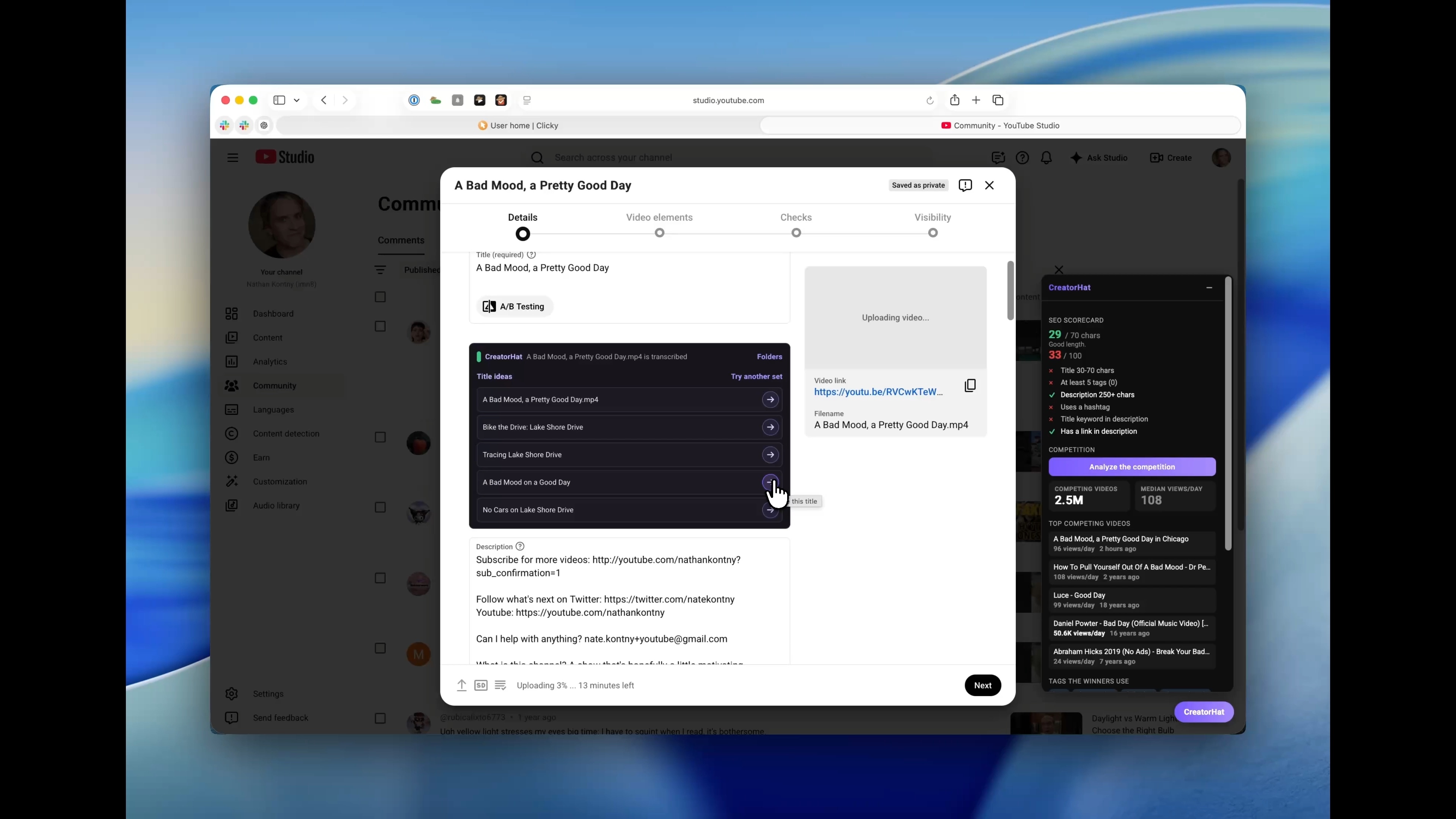
AI YouTube SEO with Apple Intelligence.
CreatorHat transcribes the file and generates writing on your Mac. You do not need a separate AI subscription or an API key for these features. Apple Intelligence must be enabled on a compatible Apple silicon Mac running macOS 26 or later.
YouTube research still needs an internet connection, and your upload still goes to YouTube. Local writing does not mean the entire workflow is offline. CreatorHat does not send your video or transcript to a cloud AI service for these suggestions.
Read it as the person who made the video.
Check names, places, and claims against the footage. Speech recognition can mishear a name, and a transcript does not describe everything visible on screen. Longer transcripts may be shortened for the writing model, so a late scene can be missed.
Use the SEO checklist as a reminder to inspect the fields. Its score is a set of checks inside CreatorHat, not a score from YouTube or a forecast of views. A relevant title and a useful opening description matter more than filling every field just to turn an indicator green.
For topic research before filming, start with competitor analysis and YouTube keyword research.
Before you start
Does CreatorHat make AI videos or thumbnails?
No. These features help research and write the text around a video you make. CreatorHat does not generate video footage or thumbnail images.
Can AI guarantee a higher YouTube ranking?
No. Clear copy helps explain the video, but search results also depend on viewer response and other signals. Treat every generated title and description as a draft.
Is CreatorHat free?
CreatorHat costs $29.99 a year after a 7-day trial. The trial is a subscription trial, not an unlimited free web generator.
Which Mac do I need?
CreatorHat requires macOS 26 or later and Safari. AI writing also needs a compatible Apple silicon Mac with Apple Intelligence enabled and available in your language. Enable the extension and allow it on YouTube and YouTube Studio.