Search results
Check one visible channel at a time. Matched videos gain outlier badges and views/hour, so useful context stays with each thumbnail.
 CreatorHat
Now on the Mac App Store
Your browser. Your vidIQ account.
Your keyword research belongs beside the videos. Your title feedback belongs beside the title field.
CreatorHat is a Safari extension that brings your vidIQ account into YouTube and YouTube Studio. Scores and suggestions appear where you work, through an optional connection in Settings. See how to connect.
CreatorHat is $29.99/year after a 7-day trial. vidIQ research uses your own vidIQ credits. For Mac, on macOS 26 or later.
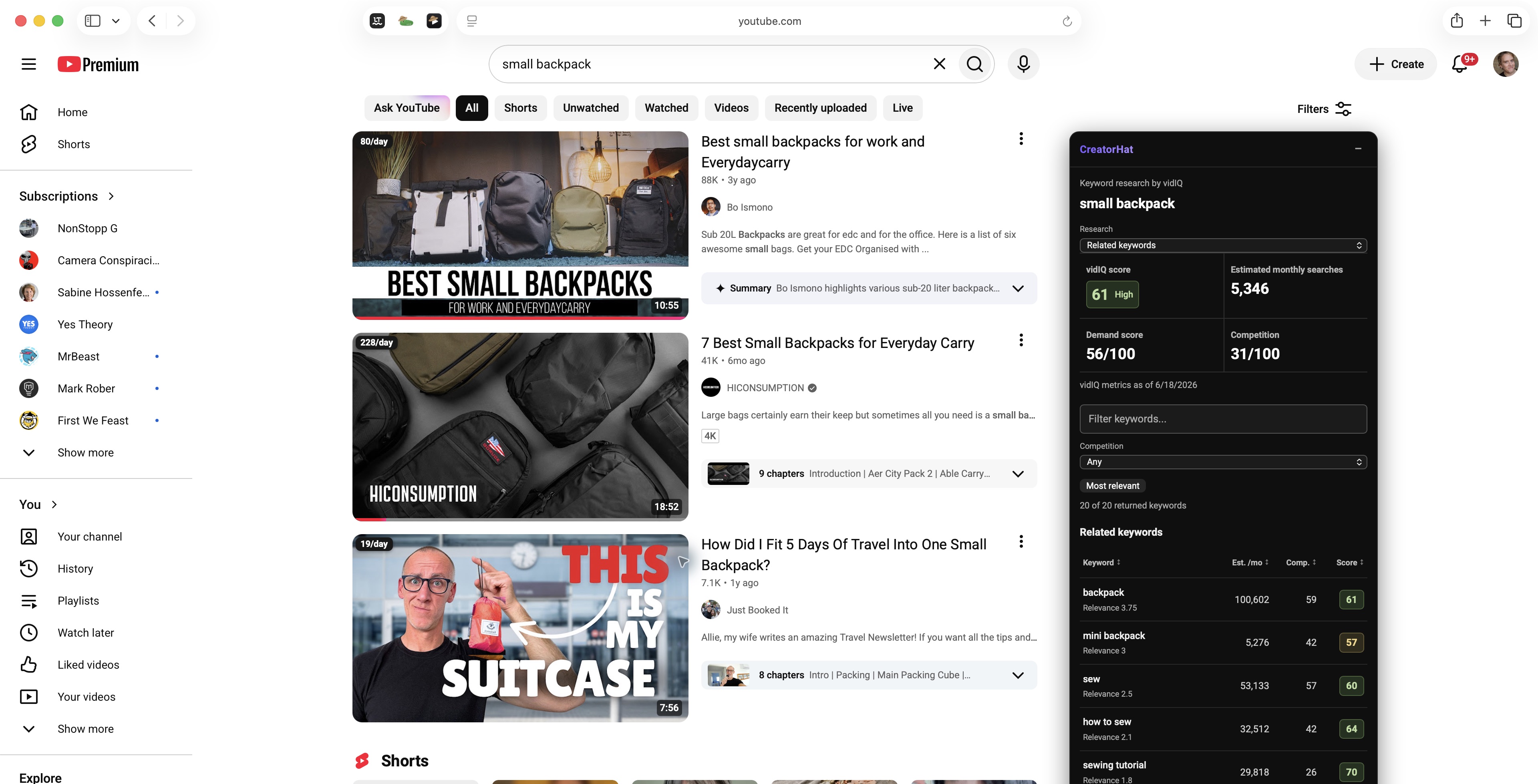
01 / Search results
First, click the CreatorHat icon in Safari's toolbar. Open Settings (the gear), then choose Connect vidIQ and sign in. See the setup steps.
Then search on youtube.com in Safari. The CreatorHat panel appears beside the results, or above them in a narrow window. It follows your search as you browse. The vidIQ panel only appears after you connect your account.
Click Research this search to get a keyword score, estimated monthly searches, demand, competition, and related phrases. Click a phrase to see its YouTube results.
Sort and filter saved results without spending credits. New research is an explicit action, with its credit cost shown.
Watch the research walkthrough ↓30-second visual walkthrough
See the metrics, narrow the results, and explore two ways to find a more specific topic.
02 / Search, channels, and watch pages
See how a video is doing against its channel's usual performance. vidIQ adds outlier multiples and views per hour to the YouTube pages you already use.
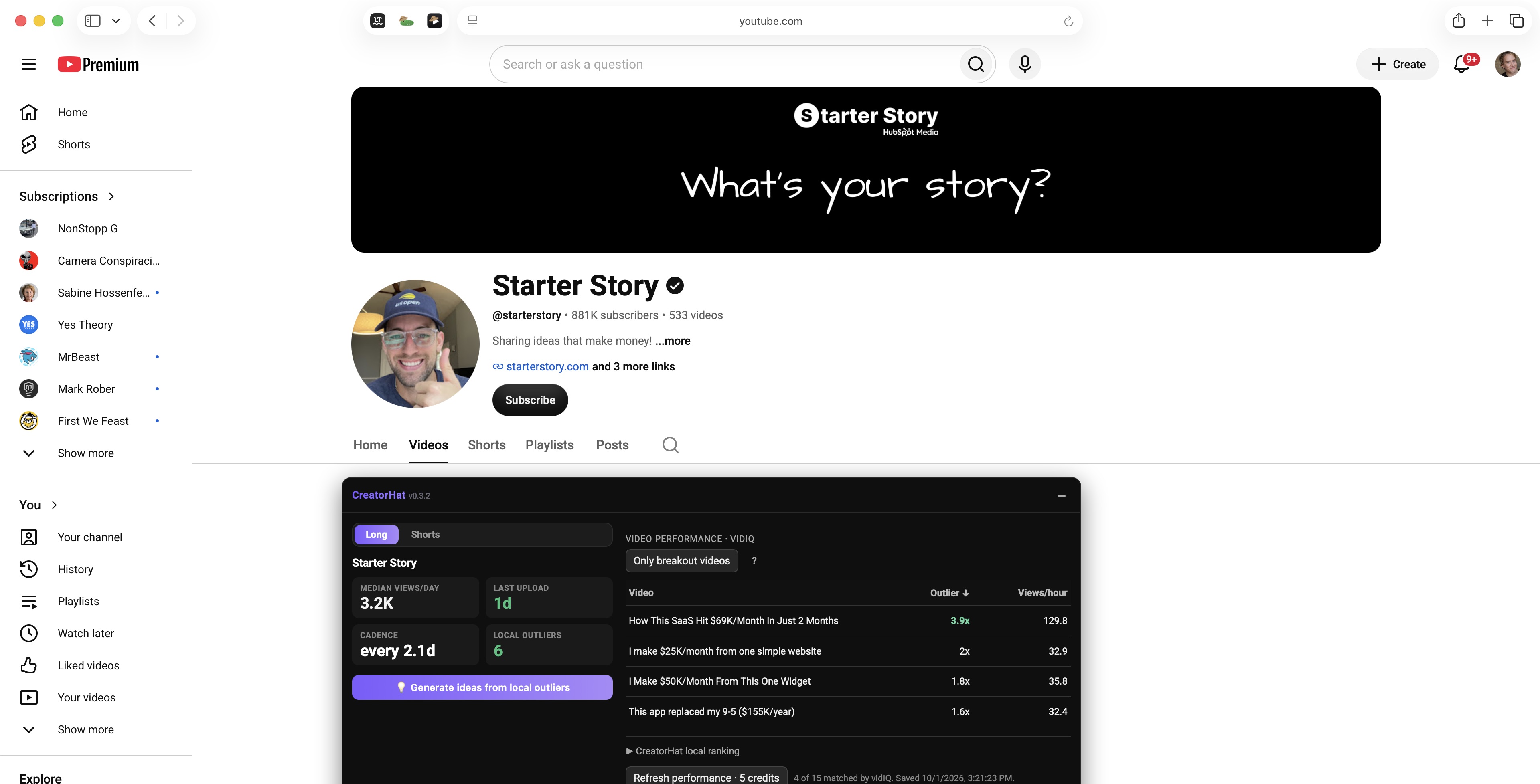
Check one visible channel at a time. Matched videos gain outlier badges and views/hour, so useful context stays with each thumbnail.
Sort the performance table. Use Only breakout videos to show videos doing at least 2x the channel's usual performance, according to vidIQ.
Open a video and keep the same performance context in its sidebar, alongside the SEO checklist, tags, and title ideas.
Coverage varies. If a returned vidIQ sample does not match a video, CreatorHat keeps its local views/day. A missing match is not a verdict on the video or your account.
03 / YouTube Studio
Review your title with vidIQ and compare scored alternatives without leaving Studio. Choose an idea to put it in the title field. You still decide what to save.
Thumbnail feedback reviews your published thumbnail with your current title. Unsaved thumbnail changes are not included.
CreatorHat's on-device writing tools are still available. Use local ideas when you want Apple Intelligence to work from your video on the Mac.
Explore CreatorHat's local upload tools →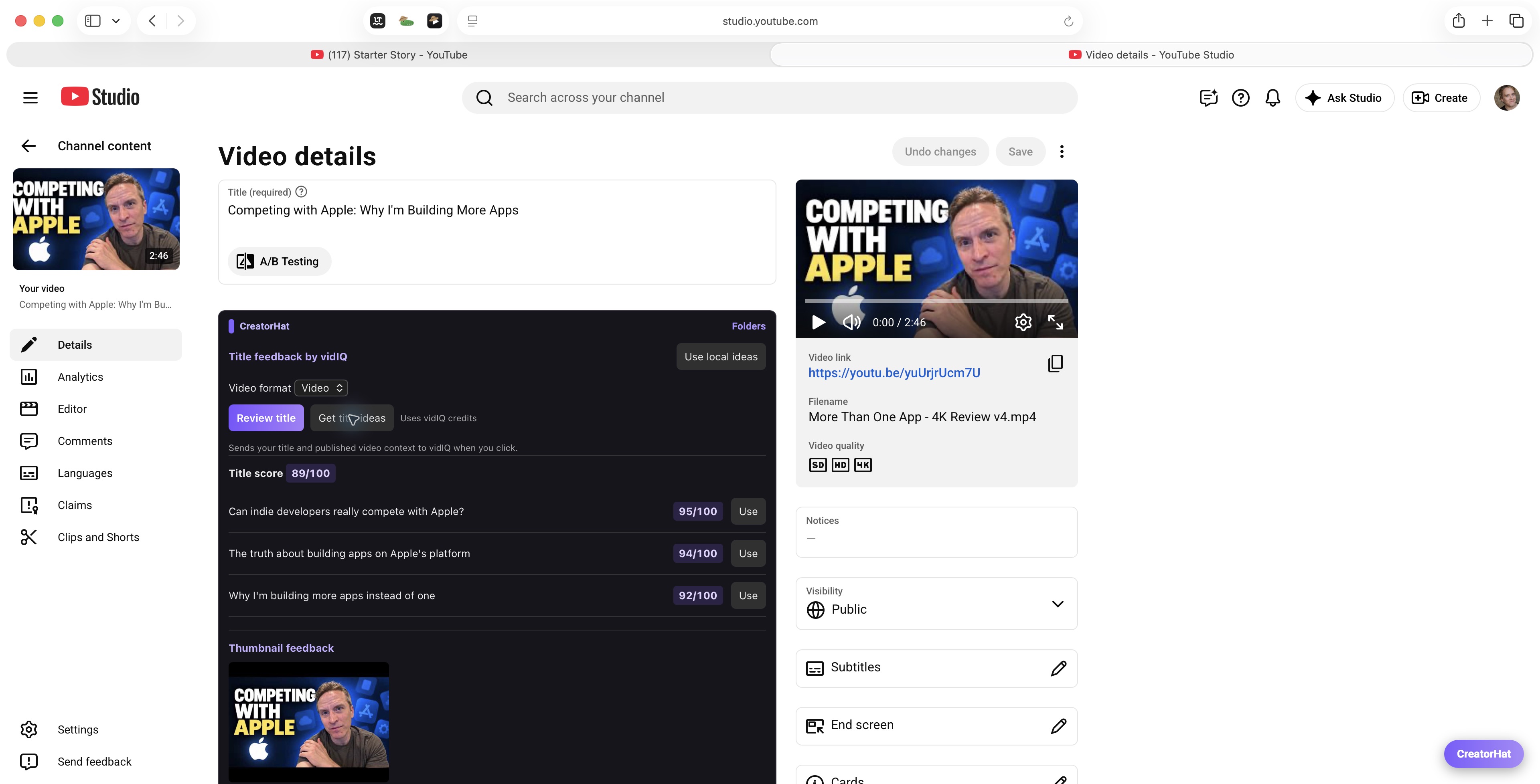
25-second visual walkthrough
From a badge in search to channel context, a watch-page sidebar, and feedback inside Studio.
Connect once in Settings
No API key to find or paste. CreatorHat opens vidIQ's own sign-in and authorization flow.
Get CreatorHat for Mac ↓Download from the Mac App Store. Open the app, then enable CreatorHat in Safari Settings > Extensions. Allow access to YouTube and YouTube Studio.
Click the CreatorHat icon in Safari's toolbar, open Settings (the gear), and choose Connect vidIQ. Sign in to your vidIQ account and authorize the connection.
Search for a topic on youtube.com. The CreatorHat panel appears beside the results, or above them in a narrow window. Click Research this search to get keyword results. For matching phrases or questions, choose Matching terms or Questions (English) in the panel's Research menu, then click the research button. Saved results are reused.
Built-in tools come with it
CreatorHat works without a vidIQ account. You already get views/day badges, local channel comparisons, keyword suggestions, rank tracking, tags, and on-device upload help.
Connecting vidIQ adds its keyword estimates, performance data, and scored feedback to those same surfaces. Disconnect in Settings any time.
Apple Intelligence must be enabled on a compatible Mac for local AI features. Optional vidIQ requests send the relevant research or review context directly to vidIQ. Read the privacy details.
Before you connect
Updated October 2, 2026. Screenshots show the public CreatorHat 1.0.2 release.
No. CreatorHat is an independent Safari extension with an optional, direct vidIQ connection through vidIQ's MCP service. vidIQ's own extension supports Chrome, Firefox, and Edge. CreatorHat is not made by or affiliated with vidIQ. vidIQ's browser support.
Yes, the integration was tested with a free vidIQ account. vidIQ currently offers MCP access on Free, Boost, and Max during its launch period. You need available credits, and access remains subject to vidIQ's limits. A paid vidIQ plan is not required for the features shown in our test. vidIQ's current MCP availability.
CreatorHat is $29.99/year after a 7-day trial. It does not include a vidIQ subscription or credit allowance. The current keyword research and video-performance checks shown here cost 5 vidIQ credits per new request. Other review actions show their cost when available. Reading, sorting, and filtering saved results does not spend credits.
No. Fresh vidIQ research and reviews require an explicit action. Browsing, changing the research mode, and opening saved results do not trigger a new paid request. You choose when to refresh.
Matching Terms finds searches containing your seed words. Questions finds English question searches about the topic. Relevance measures how closely a related phrase fits the seed keyword; it is separate from the score that balances demand and competition. Monthly searches are estimates. vidIQ's keyword guide.
The performance check uses a sample returned by vidIQ and matches it to videos on the page. Coverage varies. An unmatched video keeps CreatorHat's local views/day. This does not prove the video is absent from vidIQ's database, or that your account needs an upgrade.
No. This integration covers the keyword research, video performance, title ideas, and published-thumbnail feedback shown here. It does not reproduce vidIQ's entire suite, private analytics dashboard, coaching, or every Chrome feature.
You sign in on vidIQ's own site. CreatorHat stores the connection securely in your Mac's Keychain. Reviews do not publish changes. A title suggestion changes the field only when you choose it, and YouTube's Save action remains yours. Thumbnail feedback uses the published thumbnail, excluding unsaved changes.
YouTube creator tools for Mac
CreatorHat for Safari. $29.99/year. 7-day trial.

macOS 26 or later. Optional vidIQ connection uses your vidIQ account and credits.